OkaySlept late
Your whole week.
One glance.
For people who plan by the week and live by the hour. Tasks, each day’s hours, habits and mood on one page — on iPhone and in any browser.

In 30 seconds
See a week go by.
Type a task, drag it to another day, look at the day by the hour, tick habits, log lunch, check the month.
One day, all of it
A day is more than a to-do list.
Most planners keep your tasks. Taskweek keeps the day around them, so you see how it is going, not only what is left.
Wed, 14 OctToday
☾ 7 h 48 m▲ 10 2306
📚Read
💊Vitamins
🧘Stretch
🌙No phone
7:00 Gym
9:30 Team standup
12:00 Haircut
G15:00 Parent-teacher meeting
19:00 Piano lesson
Write the launch emailProduct launch
Tasks with times
Coloured, repeating, grouped in projects.
Habits
Rings in the day where you did them.
Mood
A coloured dot for how the day felt.
Sleep and steps
From Apple Health, as plain numbers.
Your calendars
Google and iPhone events in the same day.
Projects
Each step shows its project's name.
Plan
No forms. Just write.
Write “17:15 Judo” and it lands at 17:15, in order with the rest of your day. No date picker, no time wheel, no Save button.
The usual way
TitleJudo
DateWed, 14 Oct ›
Time17 : 15 ›
DurationNone ›
Save
A form, a picker, a Save button
In Taskweek
One line, done
- Unfinished tasks move to today by themselves
- Drag a task to another day
- Repeats daily, on chosen days or monthly
Day view
See where the day has room.
Taskweek lays out the day by the hour and shows the free time between. Drop a task into a gap and it takes that time.
- “Busy until 21:15 · 6 h 17 min free”
- A line for right now
- Your calendar events in the same day
Habits
Habits that fit real weeks.
Not everything is daily. Set a habit for every day, chosen days, or three times a week, and a busy Tuesday won't break the streak.
- Every day, chosen days, or a number per week
- Streaks and the last day done
- Rings on each day of the week
📚 Read 20 minutesEvery day
9 days in a row
🧘 Stretch3 times a week
3 of 3 this week · 5 weeks in a row
🏃 RunMon, Wed, Fri
4 weeks in a row
🌙 No phone after 22:00Every day
3 days in a row
Mood
Notice how your days feel.
Check in as often as you like, each time with a note. The month view puts your weekdays side by side, and Claude or ChatGPT can look through your entries with you.
- Seven steps, from Awful to Amazing
- Several check-ins a day
- Weekdays side by side in the month view
Wed, 14 Oct3 check-ins
GreatGood review
GoodWalked home
Month review
Your month, in numbers.
At the end of a month, look back: how you felt, how you slept, what got done, which habits held, and what you quietly stopped doing. It shows what happened. You decide what it means.
September · example
Mood, average4.8/7August: 4.5
Sleep, average7 h 21 mAugust: 7 h 09 m
Tasks done84August: 75
Habits kept88%August: 82%
Your own numbers, side by side. Taskweek does not draw conclusions from them.
Tasks done, by week
September · example
Quietly dropped
Stopped without a decision. Keep it, or let it go?
Plan tomorrowRepeating task · not done 5 times in a rowKeepLet go
Evening walkHabit · not done for 12 daysKeepLet go
Food log · Pro + Food
Say what you ate.
Get the numbers.
Write it the way you would say it, or take a photo of the plate. An AI service estimates calories, protein, fat and carbs, and the day adds them up. Pick the real size and the numbers follow.
1 540kcal today · exampleP 74 · C 182 · F 52
BreakfastOatmeal with a banana, coffee410
LunchPlov, a plate; tea with sugar652
Dinner📷 Chicken salad478
Numbers are estimates. The photo is used for the estimate and not kept.
Looks
Make it look like yours.
Four looks, each in light and dark. Choose once and your iPhone and browser follow.
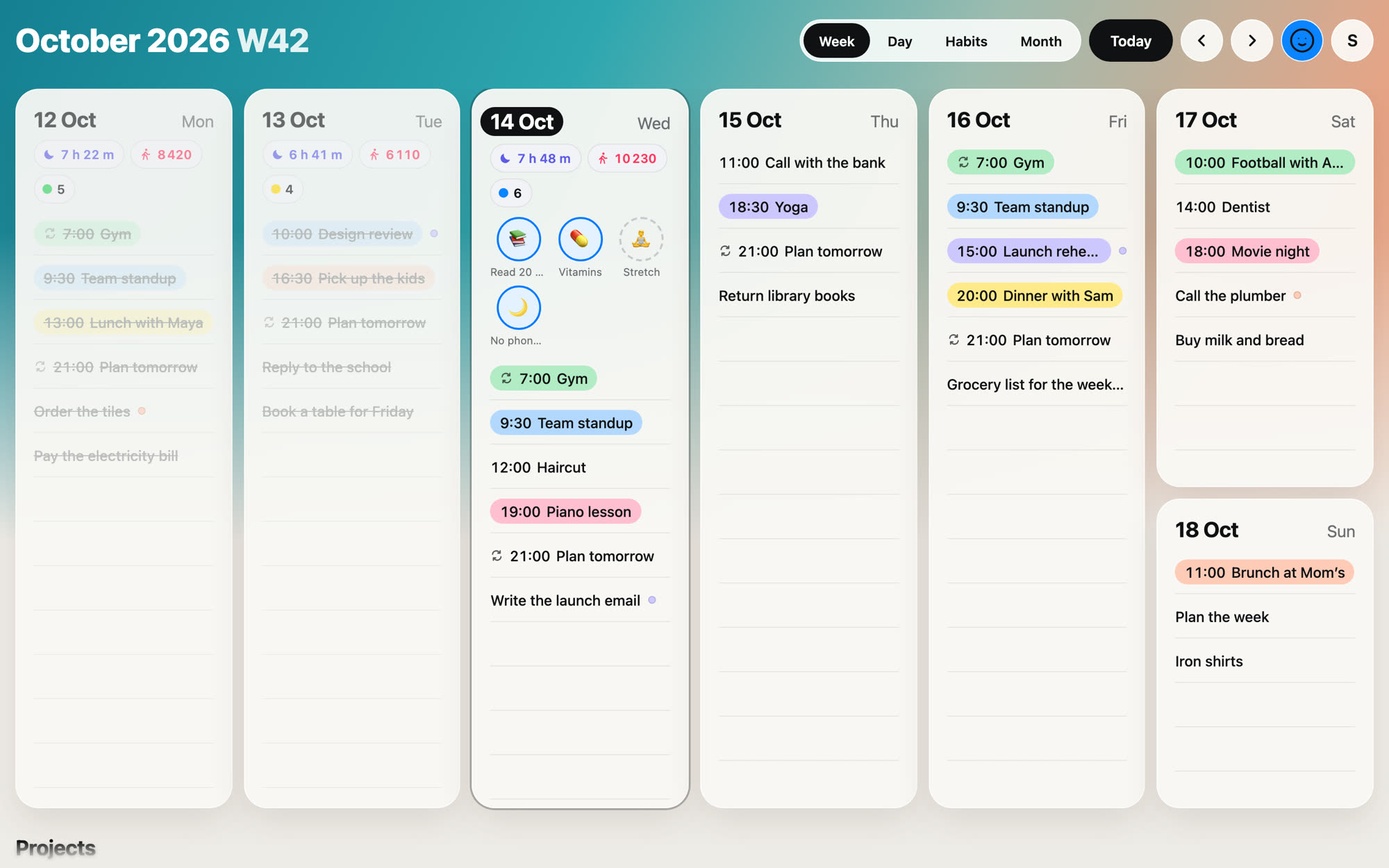
October 2026
12 Mon
7:00 Gym
9:30 Standup
Order the tiles
13 Tue
10:00 Review
16:30 Kids
14 Wed
7:00 Gym
12:00 Haircut
19:00 Piano
15 Thu
11:00 Bank
18:30 Yoga
16 Fri
15:00 Rehearsal
20:00 Dinner
17 Sat
10:00 Football
14:00 Dentist
18 Sun
11:00 Brunch
Plan the week
Connectors for AI assistants
Talk to your week
from Claude or ChatGPT.
Connect Taskweek to Claude or ChatGPT. Ask what you keep putting off, turn the promises in your emails into tasks, or hand it the tasks you marked for AI. The assistant sees your week only when you ask, and you can disconnect it at any time.
What did I keep pushing this week?
⚙ Taskweek get_tasks · 12–18 Oct
One task moved three times: Call the plumber in Kitchen refresh. It is on Saturday now and still open.
Here's the email from the school. If there is something to do, add it.
⚙ Taskweek add_task
The school asks for the trip form by Thursday. I added “Sign the trip form” to Wed 21 Oct, the day before it's due.
In Claude, add taskweek.app/mcp as a custom connector, then sign in to Taskweek.
Also works with Claude Code, Codex, Cursor, Gemini CLI and other apps that connect to MCP servers.
Everywhere
Tick it on the phone.
It's done on the laptop.
The same week on iPhone, in any browser and in your Mac's menu bar. The iPhone works offline and catches up later.
Wed, 14 OctToday
9:30 Team standup
12:00 Haircut
19:00 Piano lesson
Wed, 14 OctToday
9:30 Team standup
12:00 Haircut
19:00 Piano lesson

Pricing
Free to plan.
Pro when you want more.
Free
$0
The week, repeating tasks, the day, projects, three habits, mood, reminders, two looks, the Mac timer.
Pro
$3.99 a month
or $29.99 a year
Everything in Free, and the month review, your calendars, Apple Health sleep and steps, Claude and ChatGPT, habits without a limit, every look.
Pro + Food
$5.99 a month
or $44.99 a year
Everything in Pro, and the food log: write or photograph a meal, up to 10 photo estimates a day.
Pro and Pro + Food start with a 14-day free trial. Cancel any time: in the App Store on the iPhone, in Settings on the web. Prices in US dollars; the App Store shows your country’s price.
Questions
Good to know.
Is Taskweek free?
Yes. The week, repeating tasks, the day by the hour, projects, three habits, mood, reminders, two looks and the Mac timer are free, with no time limit and no card. Pro adds the month review, your calendars, Apple Health sleep and steps, Claude and ChatGPT, habits without a limit and every look.
How does the free trial work?
Pro and Pro + Food start with 14 days free. Cancel before the trial ends and you pay nothing.
How do I cancel?
On the iPhone: Settings → your name → Subscriptions → Taskweek. On the web: Taskweek → Settings → Plan. The plan stays on until the end of the period you paid for.
Does it work on my computer?
Yes. Open taskweek.app in any browser and sign in with the same account; a task ticked on the phone is ticked on the laptop. On a Mac there is also a free menu bar timer in the Mac App Store. There is no Android app; on Android, use the website.
Who can see my data?
Only you. Your data is kept in a database in Canada, and each account can read only its own. Taskweek shows no ads and never sells your data. Delete your account in Settings and everything goes with it.
How does AI fit in?
Only where you turn it on. With Pro you can connect Claude or ChatGPT to see your week and add tasks; disconnect it any time in Settings → AI apps. With Pro + Food, the words or photo of a meal go to an AI service to estimate calories, protein, fat and carbs; the photo is not kept.
Does the iPhone app work offline?
Yes. Changes wait on your iPhone and sync when you are back online.
Can I bring my tasks from Tweek?
Yes. On the web, open Settings → Account → Import from Tweek and choose your export files.
Privacy
Your week stays yours.
No ads, no trackers
Taskweek shows no ads and runs no third-party analytics or trackers. Your data is never sold.
Only you
Each account sees only its own data. An assistant gets in only if you connect it.
Gone when you say
Delete your account in Settings, on the web or the iPhone, and everything goes with it.
Why Taskweek
I tried almost 30 planners.
Then I built one.
I wanted my whole week on one page and each day by the hour. I downloaded 20 or 30 apps, and none of them fit, so I built my own. My son likes structure and clarity as much as I do — I looked at the apps he used and brought what worked into Taskweek.
— Alisher, who makes Taskweek
Plan next week tonight.
Open Taskweek in your browser now, or get the free iPhone app.